Summary: in this tutorial, you will learn how to use the SQL WHERE clause in the SELECT statement to filter rows in a result set.
You use the WHERE clause in the SQL statements such as SELECT, UPDATE and DELETE to filter rows that do not meet a specified condition.
The following illustrates the syntax of the WHEREclause in the SELECTstatement:
SELECT select_list
FROM table_name
WHERE condition;Code language: SQL (Structured Query Language) (sql)
The SELECT statement evaluates the condition in the WHERE clause to eliminate rows that do not meet the condition.
Based on the result, it then evaluates the SELECTclause to include only necessary columns in the final result set.
SQL provides various operators, such as comparison operators and logical operators, that allow you to construct a condition. Sometimes, the condition is called a predicate.
SQL WHERE with comparison operators
The following table illustrates the comparison operators in SQL:
| Operator | Meaning |
| = | equal |
| > | greater than |
| < | less than |
| >= | greater than or equal |
| <= | less than or equal |
| <> | not equal |
Suppose you want to find an employee whose last name is King, you can perform the following query:
SELECT
    lastname, firstname, title
FROM
    employees
WHERE
    lastname = 'King';Code language: SQL (Structured Query Language) (sql)
The database engine performs the following steps:
- First, examine the rows in
employeestable specified in theFROMclause. - Second, get only rows whose value of the
lastnamecolumn isKing. - Third, return only columns available in the
SELECTclause:lastname,firstnameandtitle.
To find employees who are located in the USA, you can use the not equal operator (<>) in the WHERE clause as follows:
SELECT
    lastname, firstname, title, country
FROM
    employees
WHERE
    country <> 'USA'Code language: Smalltalk (smalltalk)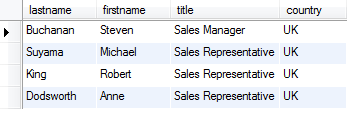
To find employees who joined the company before 1993, you can use less than operator (<) like the following query:
SELECT
    lastname, firstname, title, country, DATE(hiredate)
FROM
    employees
WHERE
    hiredate < '1993-01-01'Code language: SQL (Structured Query Language) (sql)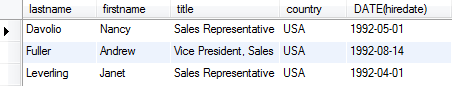
To find employees who joined the company after 1993, you use the greater-than-operator ( > ) in the WHERE clause as follows:
SELECT lastname,
       firstname,
       title,
       country,
       DATE(hiredate)
FROM employees
WHERE hiredate > '1993-01-01'Code language: SQL (Structured Query Language) (sql)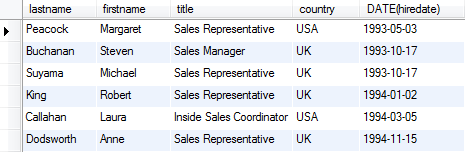
SQL WHERE with logical operators
SQL provides the following logical operators: AND, ORand NOT. You use the ANDand ORoperators to combine conditions in the WHEREclause, and the NOToperator to reverse the result of a condition.
SQL WHERE with AND operator
The ANDoperator combines two conditions and returns TRUEonly if both conditions are TRUE.
Suppose you want to find employees who joined the company after 1993 and are located in the USA, you can use the ANDoperator as follows:
SELECT
    lastname, firstname, title, country, DATE(hiredate)
FROM
    employees
WHERE
    hiredate > '1993-01-01'
        AND country = 'USA'Code language: SQL (Structured Query Language) (sql)
SQL WHERE with OR operator
The ORoperator combines two conditions. It returns TRUEwhen at least a condition is TRUE and returns FALSEwhen all conditions are evaluated to FALSE
For example, to find employees who are located in London or Seattle city, you can use the ORoperator as follows:
SELECT
    firstname, lastname, city
FROM
    employees
WHERE
    city = 'London' OR city = 'Seattle'Code language: SQL (Structured Query Language) (sql)
SQL WHERE with NOT operator
To reverse the result of a condition, you use the NOT operator. For example, to find employees who are not located in London or Seattle city, you use the NOT operator as follows:
SELECT
    firstname, lastname, city
FROM
    employees
WHERE
    NOT (city = 'London' OR city = 'Seattle')Code language: SQL (Structured Query Language) (sql)
When you use more than one logical operator in the WHEREclause, the database engine evaluates the NOT operator first, and then ANDoperator, and finally OR operator. This is known as operator precedence.
To instruct the database engine to evaluate the operator based on a specified preference, you use parentheses like the query above, i.e., it evaluates the OR operator first and then the NOToperator.
Besides those operators, you can also use the BETWEEN,