
Write a Python program to reverse a String using for Loop, while loop, and functions with an example. Reversing a string is a common requirement for seeing the character sequence, analyzing data (cleaning & processing), and so on.
In the Python programming language, there is no direct built-in string method to reverse the characters. However, there are manual approaches, such as the loops, slicing, list comprehensions, and a few methods (workarounds). This article explains every possible solution to string reversal with a detailed explanation of the code.
NOTE: A string is immutable, so once it is created, it can’t be changed. We must create a new string with characters in reverse order.
Python String Reverse using slicing
In this programming language, slicing is the most popular technique for string reversal. It contains three parameters, and we don’t need the start and stop because we need the whole string. So, all we need is a step parameter.
Generally, we use the slicing technique to access a portion of the original text. However, if we use a negative value as the third argument of the slice (step), Python reads string characters from last to first (reverse order).
Here, txt[::-1] means the slicing starts from the last character in a given string and moves towards the first character. To save these reverse characters, we assigned them to an empty string, rev.
TIP: Slicing is the most efficient technique, and easy to reverse a string.
txt = "New York"
rev = txt[::-1]
print(rev)
kroY weNPython Program to Reverse a String using a For Loop
Using loops such as the for loop and while loop are popular options for manually reversing a string. In this section, we cover the for loop, and the following section covers the while loop example.
By default, the for loop iterates over the string characters from start to end. Because it traverses each character, it gives more control over each position. The following program allows the user to enter any sentence. Next, we declared an empty string to store the reversed result.
The for loop will iterate the string characters from start to end. Within the loop, we add each character to the starting position and push the existing one to the next position. For example, st1 = Hello. In the first iteration, st2 is H. In the second iteration, e is placed in the first position, and H pushes to the last position.
st1 = input("Please enter your own: ")
st2 = ''

for i in st1:
    st2 = i + st2
print("After = ", st2)
OUTPUT
Please enter your own: Coding

After = gnidoC
You can observe from the above Python string reverse program that the word is Coding.
For Loop First Iteration: for i in st1
=> for C in Coding
str2 = C + st2=> C + ”
Second Iteration: for o in Coding
st2 = o + C => oC
3rd Iteration: for d in Coding
st2 = d + oC => doC
Apply the same logic for the remaining iterations. Please refer to the String article to understand them in Python.
NOTE: In addition to the above technique, we can use the range() function to traverse and access string characters based on an index position.
Using the range function
An alternative approach uses the for loop range function with the start value as the last character, stop as the first character, and step parameter as the negative one (-1) to read from last to first.
In the Python example below, we first declare an original string that we want to reverse and an empty string to store the result. Within the for loop range function, the len() function calculates the string length (total characters).
The for loop starts at the last index position (len(txt) – 1) and traverses up to the starting position (0). To perform the reverse iteration, the step parameter value must be set to -1. Inside the loop, the arithmetic + operator performs string concatenation using the index position of each character.
txt = "New York"
rev = ""

for i in range(len(txt) - 1, -1, -1):
    rev += txt[i]

print(rev)
kroY weNPython string reverse using index position
This example is the classic combination of the above two techniques. It uses the range() function to traverse the string characters from start to end using the index positions. Inside the loop, we add the incoming character at the first position and push the existing to the next position.
txt = "New York City"
rev = ""

for i in range(len(txt)):
    rev = txt[i] + rev

print(rev)
ytiC kroY weNPython Program to reverse a String using a while Loop
Another approach for reversing a string is using a while loop. This program looks the same as the above mentioned for loop examples. However, we just replaced the For Loop with a While Loop.
Here, the len function is used to find the length of the total characters in a sentence. The while loop condition makes sure that the i value starts at the last character index position and stops at the first index position. Inside the loop, add each character at the index position coming from the iteration to a new string. On each iteration, decrement the i value to move towards the first position.
# using a while loop
a = 'Hello World'

b = ''
i = len(a) - 1

while i >= 0:
    b += a[i]
    i -= 1

print(b)
dlroW olleHPython Program to Reverse a String Using a Function
Instead of writing the complete logic inside the code, creating a function helps to reuse the same code multiple times. The following example uses the function concept to reverse the characters in a given string. It uses the same slicing technique mentioned in the first example.
def revStr(str1):
    return str1[::-1]

a = 'Hello World!'

b = revStr(a)
print(b)
!dlroW olleHPython Program to Reverse a String using Recursion
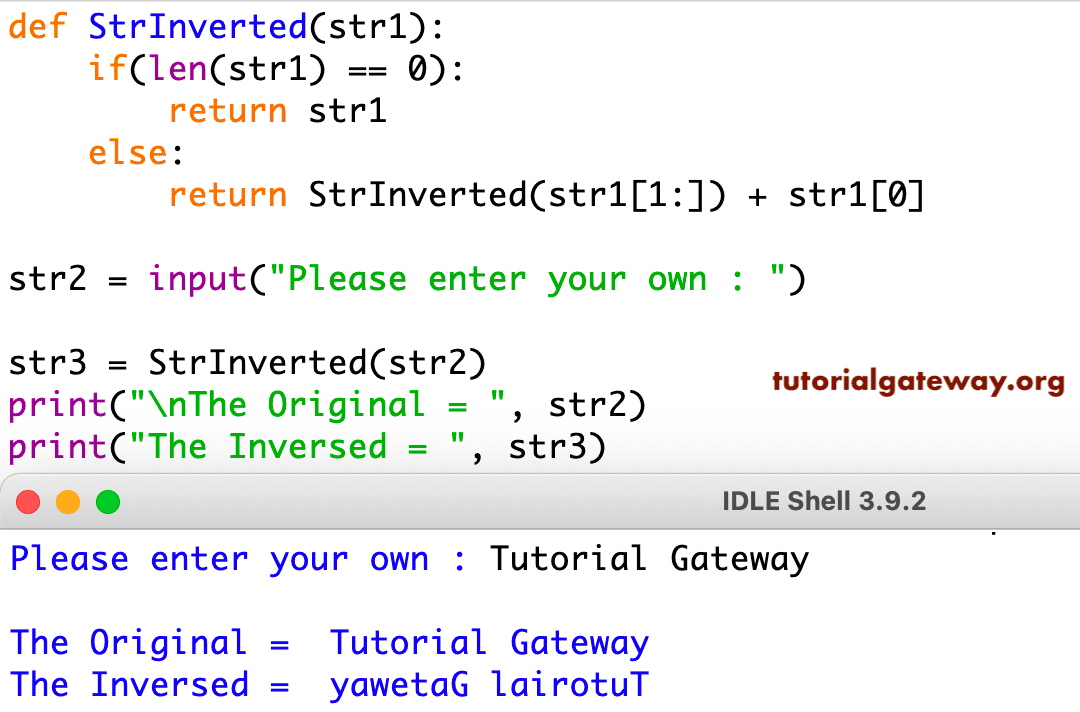
As we all know, recursion refers to calling a function with updated values, thereby allowing it to call itself. We perform string reversal in this code by calling the function recursively.
Within the declared function, StrInverted(str1[1:]) slices one character at a time, adds that character to the first position. The existing character will move to the next position.
# using a recursive function
def StrInverted(str1):
    if(len(str1) == 0):
        return str1
    else:
        return StrInverted(str1[1:]) + str1[0]

str2 = input("Please enter your own : ")

str3 = StrInverted(str2)
print("\nThe Original = ", str2)
print("The Inversed = ", str3)
Other Options
The following are the other available options that we can use to reverse a string. It includes the built-in functions, list comprehensions, etc.
Using join and the reversed function
The Python programming language provides a built-in reversed() function that reverses characters in a string and returns an iterator. As this function stores the characters in reverse order in an iterator object, we must use the join() function to join those individual characters into a new string.
txt = "New Jersey"
rev = "".join(reversed(txt))
print(rev)
yesreJ weNPython reverse a string using list Comprehension and join()
The most readable one-line code approach is using the list comprehension and the join() function. The list comprehension iterates the string characters from last to first and reads every single character. Here, the join() function joins each character to the new string (b).
a = "New City Hall"

b = ''.join([a[i] for i in range(len(a) - 1, -1, -1)])
print(b)
llaH ytiC weNUsing the reduce() function
Within the Python functools library, there is a reduce() function, which can be used to reverse a string. This example uses a lambda function inside the reduce() function to perform string reversal.
from functools import reduce
txt = "New York City Hall"
lm = reduce(lambda a, b: b + a, txt)

print(lm)
llaH ytiC kroY weNConvert to a list
In the Python programming language, we can use the list() function to convert a string to a list of characters. If you do so, use any of the techniques that we mentioned in the reverse list article.
Using the slice and join function
The following example uses the slicing technique with a negative step value inside the join function. Here, the Python join() creates a new string with the reverse of the string.
txt = "New Jersey"
rev = "".join(txt[::-1])
print(rev)
yesreJ weNUsing deque and reverse function
Within the Python collections library, there is a deque() function that can be used to deque the characters in a string. Next, the reverse function will reverse those characters. Finally, the join() function concat each character and returns the string reversal.
from collections import deque
txt = "New York City Hall"
dq = deque(txt)
dq.reverse()

rev = "".join(dq)
print(rev)
llaH ytiC kroY weNPractical Example
To find whether a string is a palindrome, we must use any of the above Python techniques to reverse a string. Next, compare the original string against the reversed. If both are the same, palindrome. Otherwise, it is not.
txt = "bnb"

if txt == txt[::-1]:
    print('palindrome')
else:
    print('Not')
palindrome