Summary: in this tutorial, you’ll have a good understanding of Python references and referencing counting.
Introduction to Python references #
In Python, a variable is not a label of a value as you may think. Instead, A variable references an object that holds a value. In other words, variables are references.
The following example assigns a number with the value of 100 to a variable:
counter = 100Code language: Python (python)Behind the scene, Python creates a new integer object (int) in the memory and binds the counter variable to that memory address:
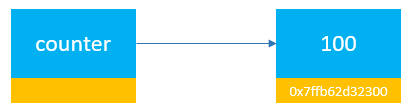
When you access the counter variable, Python looks up the object referenced by the counter and returns the value of that object:
print(counter) # 100Code language: Python (python)So variables are references that point to the objects in the memory.
To find the memory address of an object referenced by a variable, you pass the variable to the built-in id() function.
For example, the following returns the memory address of the integer object referenced by the counter variable:
counter = 100
print(id(counter)) Code language: Python (python)Output:
140717671523072Code language: Python (python)The id() function returns the memory address of an object referenced by a variable as a base-10 number.
To convert this memory address to a hexadecimal string, you use the hex() function:
counter = 100

print(id(counter))
print(hex(id(counter))) Code language: Python (python)Output:
140717671523072
0x7ffb62d32300Code language: Python (python)
Reference counting #
An object in the memory address can have one or more references. For example:
counter = 100Code language: Python (python)The integer object with the value of 100 has one reference which is the counter variable. If you assign the counter to another variable e.g., max:
counter = 100
max = counterCode language: Python (python)
Now, both counter and max variables reference the same integer object. The integer object with the value 100 has two references: