


Hi everyone, welcome to the May update for Visual Studio Code for Java! In this blog we are going to share an exciting new AI related feature for Java developers on Visual Studio Code. In addition, there will be several important Spring updates, so let’s get started.
Rewriting your Java code with Copilot-based suggestions
As our code undergoes updates and iterations, our business logic continues to grow in complexity. Meanwhile, Java versions are constantly evolving. Often, our older code can be replaced with newer, more efficient alternatives, not only improving their performance but also making the code more elegant, concise and secure. Previously, these tasks may have been done manually, but with the power of AI, many tasks can now be handled automatically.
With the release of various AI products at the Build conference 2024, we’re excited to announce an exciting update for Java developers on Visual Studio Code. In the Insider (Pre-release) version of our Extension Pack for Java, we’ve introduced a new feature: “Rewrite with new Java syntax” with Copilot! This feature integrates seamlessly with GitHub Copilot, so developers will need a GitHub Copilot license to access it.
Here’s how the feature works, on your Java class, a new CodeLens text will appear above the name of the class: “Rewrite with new Java syntax“. Once the user clicks on this, it will trigger an inspection on the current Java class. Once the inspection is complete, Visual Studio Code will show several improvement suggestions and point users to the location.

For each suggestion, additional CodeLens will appear and shows what the solution is (and what needs to be improved). The user can directly click on the CodeLens and this will bring up the GitHub Copilot inline chat dialog. The user can then see the code diff, and will be offered the choice of “Accept or “Discard”. If the user accepts the suggestion, then the workflow is over. Let’s see the first example where the for-loop can be refactored using IntStream.
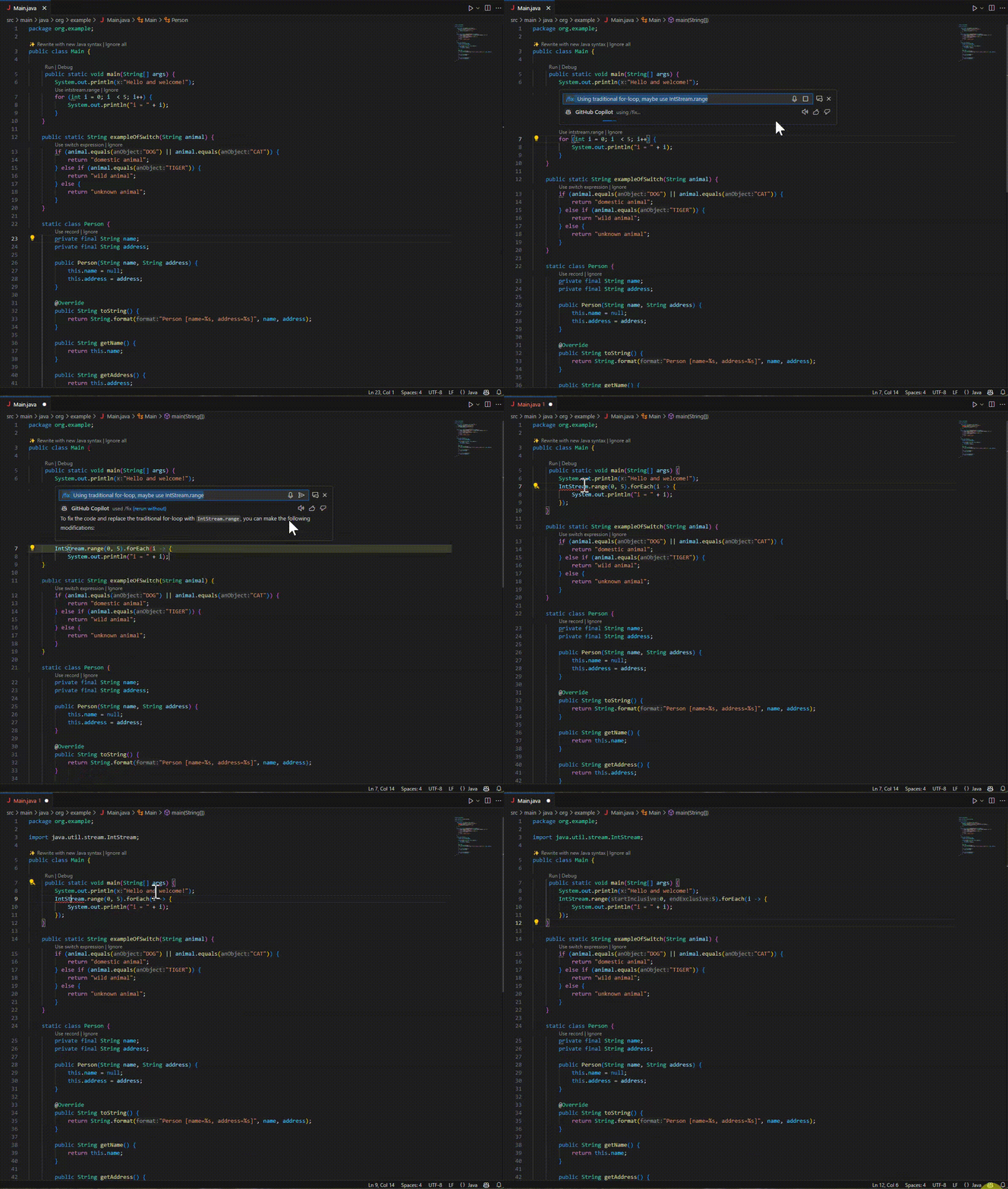
Let’s look at another example, where our feature suggests that a multiple if and else-if logic can be directly re-written as a switch expression. By clicking on the CodeLens text, the code can be directly re-written as the improved code.

Inspecting part of the class
Sometimes, we may not want inspect the whole class because the code is too complex. The feature above also supports inspecting the part of the code. We just need select the code we want to inspect, and then click on the lightbulb on the left, select “Rewrite with Java syntax”. Here’s an example:

In this way, developers can inspect the code in a much more flexible way.
This feature aims to leverage AI to offer helpful suggestions and seamless refactoring for Java developers for their code. We hope this can greatly boost developer’s productivity. If you have any feedback about this feature, please open an issue on our GitHub repo!
To use this feature, developer needs to install both Insider (Pre-release) version Extension Pack for Java and GitHub Copilot extensions. (with a GitHub Copilot license).
Spring updates
JPQL syntax highlighting
The Spring Boot Tools extension now features syntax highlighting for JPQL query strings. The syntax highlighting works for @Query annotations inside of Java source files as well as for named query property files. This makes reading those query strings much easier. (screenshot JPQL query syntax highlighting)
